




Choosing A Better Alternative To Excel For Legal And Compliance Databases
08 April 2026 · Loïc Ribet · 4 min
In one of my previous articles, I explained why Excel spreadsheets are often the wrong long-term solution for storing operational legal and compliance data.
The next obvious question is: what should you use instead?
Unfortunately, there is no single answer. It all depends on different factors that I try to summarise so you can choose a structured solution that fits your team, your constraints, and the complexity of your environment.
What is the pain point? Are deadlines being missed? Is reporting too manual? Are you able to automate or use AI easily? Are permissions unclear? Is the data difficult to trust?
How large is the team? A small team with a couple of simple registers and processes does not need the same solution as a large function operating across several business lines.
How complex is the environment? Are you working across multiple jurisdictions? Multiple subsidiaries? Different regulatory frameworks? Different owners of the data? The more complex the environment, the more important structure, permissions, and consistency become.
What is the level of regulatory exposure? If the data supports important controls, reporting, or regulatory obligations, the solution needs to be more robust.
What is the budget? Some teams need to work with existing tools. Others can invest in a more tailored solution.
What level of IT support do you have? This is one of the biggest factors. A technically strong team can support a custom solution. Legal and compliance departments with little technical support usually needs something more accessible. The best is to have a dedicated IT/Data team within the department or at least employees with those IT skills (but that tends to be very rare in Compliance and Legal).
Once you know you constraints, the first action to take is to speak with your IT department. The goal is to figure out whether they have already approved tools, internal standards, or architectural constraints that should shape the decision. So companies have also a dedicated Data team. They may also already have a solution that covers a large part of the requirement.
What about the options? I have compiled a selection of some of the solutions in the below table.
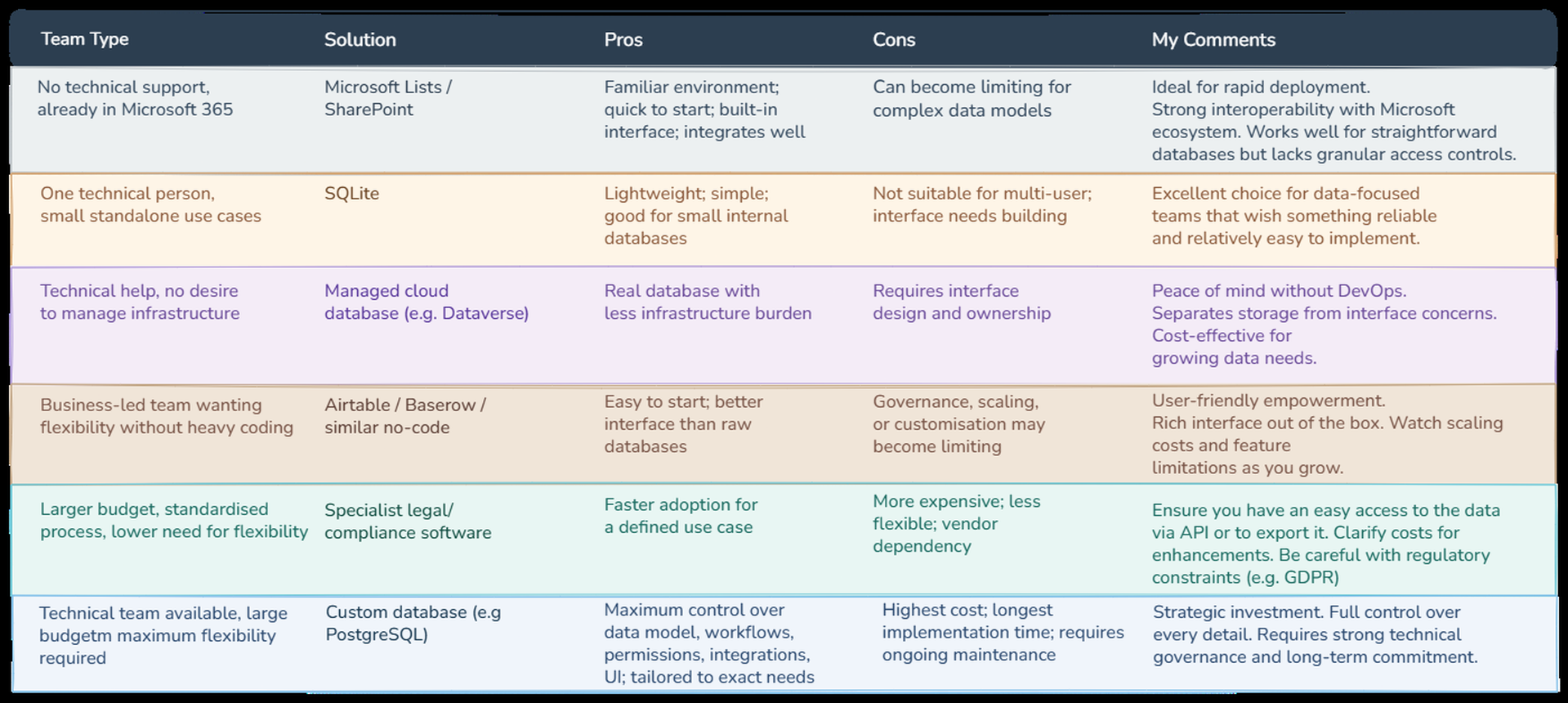
If you want the short answer, this is how I would think about it.
If you do not really have IT or technical support nor any technical skills in your team, Microsoft Lists or SharePoint Lists are probably the most practical step up from Excel. They have limitations, but they are easier to adopt and usually much easier to migrate from later if you need something more robust. One of the good side of it, is that you don't need to think of a user interface to interact with the lists, as it is quite user-friendly.
If your team has some technical capability and a bit more flexibility in what it can use, then options such as Dataverse, SQLite, or a third-party platform like Supabase can make sense. That said, with any external solution, you still need to do proper due diligence, especially on regulatory, security, and data governance requirements.
If you work in a large organisation, the right approach is usually to involve IT early and choose a solution that fits the wider internal landscape. If the project is supported and the need is clear, one option may be to build a proper relational database, for example with PostgreSQL. That gives you much more flexibility and control over how the data is structured.
At the far end of the spectrum, some teams choose to build a custom database with a fully custom application on top. This gives maximum flexibility and customisation, but it is also the most expensive and demanding route.
If you choose a proper database, you will have to think beforehand of how people will actually use it. In practice, that means thinking about the basic CRUD operations: create, read, update, and delete. In a Microsoft environment, Power Apps is often the first option people can consider. It can be a good choice, but it comes with limitations. For example, it is not really suited to building highly complex applications, so you may end up creating several smaller apps instead of one unified tool. Depending on your setup, premium connectors may also introduce extra cost.
The alternative is to build your own front end. That requires more technical capability, but it gives you much more control. I also think AI will make this route increasingly accessible, but that is a topic for another article.
One final point: do not think about this only at department level.
For medium-sized and large organisations especially, this type of decision should not be taken in isolation. It should fit within the broader data management strategy of the company, as I explained in my previous article, Compliance And Legal Are Not Just Control Functions. They Are Data Providers.
Over the last few years, many organisations have invested heavily in data warehouses and wider data platforms. That means the solution chosen by Legal or Compliance should not only work locally for the team. It should also be able to produce structured data that can later be extracted, governed, and integrated with the rest of the organisation.
My final advice would be simple: start with one project, test the solution in practice, see whether it really meets your needs, and only then scale from there.